Thursday, October 30, 2008

Design the Next BEHRINGER DJ Mixer!


Design your own DJ Mixer

Design the Next BEHRINGER DJ Mixer!
Complete the BEHRINGER DJ Survey and enter to win one of five DDM4000 Digital DJ Mixers!! 

Click Here to take survey

NUMARK WEBCAST QUICK-ALERT


This is just a quick message about the Numark live webcast tonight. 

Here are the details:

Event: Live streaming webcast of Grand VJ
Presented by: Numark and DJS Pro Audio & Lighting
When: 7:00 pm EST Wednesday October 29, 2008
To view the live stream, click here.

Numark, Akai Profesional, ArKaos, and DJS Pro Audio and Lighting are teaming up to bring you a very special event featuring ArKaos and VJ Momo the Monster. Momo will show off the latest in cutting-edge video-mixing software, ArKaos GrandVJ that’s perfect for VJs, DJs, bands, and other performers.

Momo will demonstrate the hot software, which is distributed by Numark, using his weapon of choice, Akai Pro’s MPK49 keyboard controller. Join us tonight for the live webcast!

If you can't watch the stream live as it happens, use the same link shown above to view a replay of the stream.

Wednesday, October 29, 2008

Complete Kit Gives DJs Everything They Need to DJ Using A Computer


For anyone who must have everyhtiong in one box!!

Now in stock!


See the Computer DJ in a box on Quality Dj Equipment 

 Numark, the world’s leading manufacturer of DJ technology, announces that Total Computer DJ in a Box, the perfect package for anyone who wants to start DJing, is now shipping.


Total Computer DJ in Box is a package consisting of Numark’s Total Control DJ controller, DJ|iO audio interface, HF125 DJ headphones and Native Instruments’ Traktor 3 LE DJ software. DJs can mix and scratch on Total Control, the scratch control surface designed expressly for computer DJs. DJ|iO enables DJs to get audio into and out of their computer for connection to PA system and for cueing with the included professional-grade HF125 headphones. The system is compatible with Mac and PC computers.


Total Control is laid out just like a DJ mixer or CD player, with scratch wheels, line faders, EQ knobs and a crossfader. Learning on Total Control enables DJs to move to any other DJ system with ease. Thirty-one buttons, 20 knobs and five faders give DJs powerful control capability, while USB powering frees DJs from the tethering of a wall outlet. Total Control is compatible with most DJ software and comes with pre-mapped controls for Traktor LE with no programming needed.


DJ|iO is a compact, rugged computer interface that gets audio into and out of a DJ’s computer on a USB connection. It has a microphone input, two sets of RCA outputs and a headphone output to handle all audio system connections. CD-grade, 24-bit, 44.1/88.2 kHz audio powered by ultra-low-latency ASIO drivers gives DJs the high-quality sound they expect from Numark.


HF125 DJ headphones feature seven-position adjustable earcups housing large 40mm mylar speaker drivers, a six-foot tangle-resistant cable and padding on the headband and earcups.


“There’s nothing that makes us happier than introducing the world of DJing to new people,” said Adam Cohen, Director of Business Development, Numark. “Total Computer DJ in a Box enables anyone to DJ, right now, with the music that’s already on their computer.”


Thursday, October 9, 2008

MixMeister Scratch - Cool DJ scratch tool for iPhone


We all love gadgets especially dj gadgets!

This stuff looks cool.. I guess DJs would love to play around with this native app. MixMiester Scratch let’s you perform a scratch anywhere, anytime – even right on top of any song in your iPod Touch or iPhone. MixMeister Scratch is both easy to use and fun. To get started, just choose from a list of included vinyl scratch sounds and start scratching. Scratch on top of your favorite tracks by selecting music to play from your iPod or iPhone. Then load MixMeister Scratch while the music plays and you can scratch on top of your music and adjust volume of the music in real-time using the touch interface.

http://www.mixmeister.com/scratch/images/mmscratch_splash_l.jpg

Key Features

  • Comes with preset vinyl scratch sounds to choose from
  • Scratch on top of any existing song on your iPod Touch or iPhone
  • Control volume from within MixMeister Scratch
  • Works with all firmware versions


To Get this Native App, you will have to fill in a form - Click here.

Wednesday, September 10, 2008

PLASA 2008

For the first year in many I did not make it down to Earls court for PLASA 2008!

Some of the quality DJ team stopped in past and have sent me back reports from the show.

With the advent of internet marketing, blogs and HD video the way new products are launched into the market has really changed and DJ shows like must take note!

BPM had a great start last year and looks like a different show to me it doesn't brand itself as a trade or a consumer show but does manage to cater for many different people in one weekend.

Anyway back to the new stuff we did find at plasa!

Numark is the main player showing off it's new wares with control being the buzz word of the year.

A new controller to compete with the Vestax VCI100 and some new turntable style controllers which look very familiar to some other products that we have seen on the sly recently!!


The Numark OMNI CONTROL.


The NS7 Vinyl controller / mixer et all!


NS7 Controller for Serato Itch at NAMM 2008

Wednesday, September 3, 2008

VCM600 on the way


The VCM-600 is a DJ MIDI controller designed with Vestax mixer technology. 160 parameters of the DJ software can be assigned to the advanced control section, and has excellent compatibility with Ableton LIVE 6 and 7.

DUE TO LAND IN THE UK END OCT/NOV 2008

RRP £ 515.18 EX VAT.

Qualitydj

Thursday, August 28, 2008

My BCD3000 doesn't work !! But it does I promise!

We have lots of people have this problem with the BCD 3000. This post was prompted by lots of customers in Edinburgh and some following my popular youtube video: on show at the bottom of this post


The issue is that the BCD will run with standard drivers but to get fun functionality out of it you need the proper ASIO drivers and control panel that comes on the install disc.
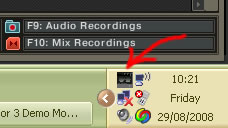
When you plug in your BCD3000 you should have a small black box in your status icon next to your clock in windows XP.

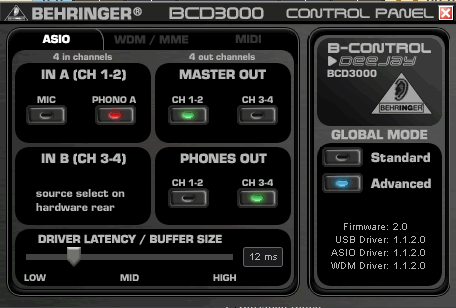
When you double click on this it gives you a simple setup dialog for the sound card.


Select Advanced mode and output channels as shown above.

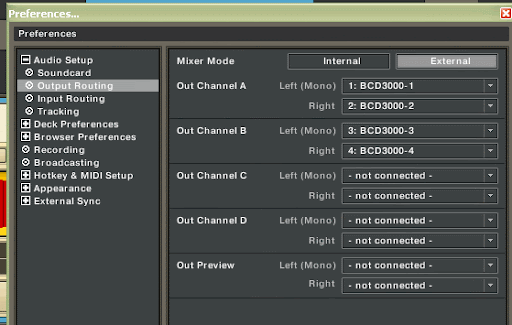
In trackor you then need to start file/preferences
then in audio setup-Soundcard check you have "BCD3000 ASIO" selected.


On the next Tab - Output Routing make sure you have external selected:


In output routing then select and assign the four outputs of the BCD to Monitor and master respectively.

If you don't see the small black box then download and run the exe below!
software here:
BCD3000setup_1-1-2-0.exe


Neil
Qualitydj

See the original video here!


BCD3000 Windows XP Driver setup

Monday, July 28, 2008

BlastCasts – Learn to Scratch with DJ Max Cooper

Beginners Tips on the blog is something that's we don't yet have enough of so I will try to collate and add some new links to beginners content.

Here is a great little tutorial for beginners which goes over the basic of scratching.


Neil
www.qualitydj.co.uk

Friday, July 25, 2008

DNHD2500 Software updates!

Denon
DJ Owner:

We are pleased to announce new software for your DN-HD2500
Media Player & Controller, that will enhance the performance of your
machine.

Latest Plug In’s: (v1400 - as of July,15 2008)
-Added:
Instant Playback from Cue stutter, A1, A2 STR modes when the PLAY button is
pushed simultaneously
-Added: .WAV Album sorting by Track ID3 tag, so Album
list appears in the same track order as your CD's
-Improved other minor bugs
listed with the firmware download

**Full details can be found in the
download

The DN-HD2500 is currently supported by these DJ applications
when used as a MIDI controller:


You can find more
information about this release and how to obtain the new software via the denon
website: http://denondj.com/plugin.asp?prod=DN-HD2500&x=25&y=5


The product can be found here on qualitydj

Saturday, June 14, 2008

SL-DZ1200


Behringer DDM4000 Midi Mixer review on SL-DZ1200.

This Mixer is now in stock at Quality DJ

Monday, June 9, 2008

Xone:4D Launches

Xone:4D

Following our preview information about the new Xone:4D, we are also pleased to announce its official release. The mixer, which has the new 20 channel USB 2.0 soundcard has many new features to enhance the digital DJ's experience, such as many more MIDI control messages available, new BPM section and the UV sensitive legend for outstanding visibility and ease of use.


More details are now on the Xone website, www.xone.co.uk.

This will be launched to the public at the Sound Recording Technology show (part of LIMS) this week, so if you are attending the show, please visit us on stand F58.


This product is so new that we don't have it on the quality DJ Website yet!!

But click here in the next few days and it will be added to our listing!

Friday, June 6, 2008

Ortofon Evolution Headshell!


Old School Evolves

Ortofon have released a headshell with a tasty design.

Words: David Eserin


The new headshell does not come cheap at £49 a pair, but
the new look enables you to add extra weight in the same colour as your
cartridge.


Its grip is curved so it's easy to keep hold of, and they're a perfect fit for any Ortofon OM series DJ cartridge.


PRODUCT: Ortofon Evolution

TYPE: DJ Headshell
PRICE: £49

OUT: Now


SPECS


* Easy-to-grip curved finger lift

* Unique design

* Numerous weight options

* Perfect fit for any Ortofon OM series DJ cartridge

* New designed OM mounting tool for easy
mounting included


See all our ortofon carts on quality dj equipment


Thursday, June 5, 2008

DDM4000 Now in Stock!


Finally in stock this well publicised mixer with effects and tracktor LE included in the box!

Wednesday, June 4, 2008

VCI300 Makes Club Debut

The new VCI 300 will be featured as new product on our site over the next couple of days!


See the Product in action
here and more info on the new VCI300 here.


See the current model the VCI100 here

Tuesday, June 3, 2008

New Akai Products for June

New Products For June
Akai MPC2500
Akai MPC2500
£849.00
Akai MPK49
Akai MPK49
£269.00


Akai MPD32
Akai MPD32
£219.00


We have added a number of additional Akai products to our online catalogue! Some of these will be available direct from manufacturer and some will be in store for demo please see product descriptions for more details

See all Akai products here!

The Waiting is over ... PCDJ Reflex has Arrived!


PCDJ based in the US have been around the marketplace for a number of years and brought some of the first DJ software to the mass market.

This is the first major re-design from the bottom up that they have done and the results have been highly anticipated.

The software has some heavyweight backers with Denon supporting it in native Midi Support and giving away an LE edition with their products.

Get the PCDJ Reflex free trial version Here

Th PCDJ Reflex product retails at £199 on Qualitydj and is available as an
LE Version free with the Denon DNHC4500

Posted By QualityDJ Equipment


Denon releases new software for DNHD2500


Denon have released the new software update for the popular DNHD2500


This brings the unit up to date along with the new DNHC4500 which is now shipping!

This includes the following main features noted below

We are pleased to announce new software for your DN-HD2500
Media Player & Controller, that will enhance the performance of your
machine.

Latest Plug In’s: (v1300 - as of June 2008)
-Added: Windows
Vista support in MIDI mode
-Added: support for new iPod Classic & Nano
(gen 6)
-Added: the ability to go back UP the search list from the Title
level
-Added: Album sorting by Track ID3 tag
-Added: Folder searching by
Player & Keyboard
-Added: “Hot List” Function by player and
keyboard
-Added: more Keyboard functions
-Added: USB Format tool, we can
now format NTFS drives to FAT32
-Improved other minor bugs listed with the
firmware download

**Full details can be found in the download

The
DN-HD2500 is currently supported by these DJ applications when used as a MIDI
controller:


You can find more
information about this release and how to obtain the new software via our
website: Here

Posted by Quality DJ Equipment from Quality DJ

Sunday, June 1, 2008

Numark DDS80 MP3


Numark DDS80

Numark DDS80 MP3 player

Numark have jazzed up their D2 digital media player.

Words: David Eserin

Numark DDS80
Front on

The new DDS80 still plays from virtually any USB storage disk and MP3 player, but now it has a posh new colour screen and comes with a rack drive unit.

The rack adds twin CD/DVD playback along with an 80GB hard drive to store your music. It's not fixed yet, but the price should be around £599 when it comes out in summer.

PRICE: £599
OUT: Summer 08
UK CONTACT: 01252 341 400
Link: numark.com

SPECS

* Large backlit, full-color display with revolutionary user interface
* Key lock support for maintaining key while tempo shifting
* Visual Track Profiles show energy changes for precise phrase searching
* Seamless looping, pitch control, scratching capability via jog wheels
* Text-search, letter-pick scrolling, and on-board playlist creation
* 3 USB ports for iPods, thumb drives and hard drives
* Play music from two devices simultaneously, including two songs from the same iPod
* Scratch with MP3, WAV and AAC (unprotected) files
* Pitch control with range up to +25% and down to -100%
* Beatkeeper™ technology with TAP override function
* Searches via two large jog wheels and uses skip peak searching in profiles
* 2 front-facing USB ports for additional expansion

Friday, May 23, 2008

Where is control going next?

I have spent a load of time with my install hat on the last couple of weeks looking at some developments in control of automated house systems etc.

Control in Dj Equipment has certainly evolved hugely over the last few years in the same way that 12" record sales have declined the amount of new innovations in control have grown hugely.

The big manufacturers can be really slow and old fashioned with there ideas and often we find that small projects are swallowed up by the big boys and made there own!

The Pacemaker and Vitrual Dj to name a couple.

See this video below of another project based out of the box controller!!


Percussa Cubes basics from Livid Instruments on Vimeo.

What we are listening to!


The current listening at QualityDJ

is from Buzzin Fly Radio Show with Ben Watt listen live above!!

Tuesday, May 20, 2008

Bullet proof Decks!


Protect your decks with this innovative product from www.decksaver.co.uk


Stops dust and scrapes to your prized possesions fit the CDJ1000 mk3 and CDJ1000 MK 2

Friday, May 16, 2008

Technics Repairs - they last for ever!


Marc from Scratchworx has been investigationg the rumours of Panasonic the worldwide monster that manufacturs 1200's and 1210's stoping production and support for certain models.

This may well effect our ability to carry out the same level of Technics repairs in the workshop in Edinburgh in the future. For now we have not experianced any problems in getting parts for the main models.

See the whole story here and an extract below:

the 1200s.com forum:
So
it seems the wonderful people @ Technics, actually Panasonic, or even
more so Matsushita Corp (the parent company of them all), has decided
to start discontinuing parts for the famed SL1200MK2 / SL1210MK2
turntables. They've started by discontinuing all of the Circuit Boards,
asking technicians to repair any issues at the component level on the
board. The problem is that some of these components are now also being
discontinued. More specifically they are discontinuing some very
important IC's (Integrated Circuits), which are pretty much what makes
this unit so powerful.

So, now what? We have a lot of Technics
1200 series turntables just sitting in the shop, waiting for repair,
but we can't do anything because we can't get parts. We are trying to
see if the MK5 or M5G parts will work, but haven't performed any tests
as of yet.

Common issues with the main board that affect these units are irregular pitch / drive issues:
- spins too fast
- spins too slow
- extremely slow start up
- washing machine affect (back and forth jerking)
- wont stop when the start/stop button is pressed

All
of these issues are directly related to one or more of the ICs on the
main board. So if you are experiencing any of these issues, I thought
it would be good to know what your up against.

Not sure what
the plan is, but we were told by a sales rep @ Matsushita, they
eventually want to phase out the MK2, and even the MK5 - which is the
purpose for the MK6 release!

Thursday, May 15, 2008

Ableton live 7 coming to a store u know!

Ableton is proud to announce the release of Live 7 LE, an
easy-to-use, professional-grade music-making solution that everyone can
afford. Live 7 LE is built on the same fundamental concepts as Ableton
Live, the music production and performance solution that has won
numerous awards for its innovative workflow and refreshing simplicity.
Offering most of Ableton Live 7's new features, the LE version makes
music-making fast, easy and fun. Ableton Live 7 LE gives you an
intuitive interface and pro features for recording, songwriting,
remixing and DJing. It includes:


  • Studio-quality recording up to 32-bit/192 kHz*
  • Sixty-four audio tracks and unlimited MIDI tracks per project
  • Powerful and creative MIDI sequencing for software instruments
  • More than twenty built-in audio effects, including a host of creative delays, filters, distortions, studio compressors and EQs*
  • Two software instruments-Simpler for creative sample-based synthesis, and Impulse for dynamic, sampled drums*
  • VST and AU effects and instruments support; automatic plug-in delay compensation*
  • Real-time time-stretching and warping of AIFF, WAV, Ogg Vorbis, FLAC and MP3 files for DJing and instant remixing
  • Real-time tweaking of Live's controls with any MIDI controller-just
    MIDI-map it or choose from a list of popular supported controllers for
    instant mapping
  • Single-screen user interface for simple, creativity-focused operation
  • Multicore and multiprocessor support
*Live LE is limited to two simultaneous stereo audio inputs and
outputs, twelve built-in audio effects, eight built-in instruments, two
AU/VST effects and two AU/VST instruments per project. Live 7 LE has
everything you need to start making music, including:
  • Sampled instruments: Essential Instrument Collection 2 LE Edition by SONiVOX and ChocolateAudio (boxed version only)
  • Loops and construction kits by Puremagnetik (boxed version only)
  • A wide selection of presets for Live LE's instruments and effects
  • Extensive built-in step-by-step tutorials
  • Printed reference manual in English
  • Localized software menus, tutorials and PDF reference manuals available in English, Spanish, French, German and Japanese

Available soon from qualitydj

Saturday, May 10, 2008

PCDJ and Vestax ????? not what you think.

Vestax launch new dedicated PCDJ website featuring all there computer contactable products:


Welcome to pcdj.vestax.com!
This website features new computer related Vestax products,
applications, support info, user reports and many other useful tips for
DJing with digital data.

TECHNICS SL-1200MK6 Happy Birthday SL


TECHNICS SL-1200MK6 Direct Drive Professional Turntable


With the soon coming 35th birthday of the Technics SL1200 turntable,
Panasonic has released a limited edition of the legendary turntable.
The SL1200 MK6 will be available sometime!. Since its release
in 1972 approximately 350.000 units have been sold worlwide. The
limited edition will come in two regular color settings (SL-1200MK6K1
in black and SL-1200MK6 in silver).


Some of the 'below the surface' improvements:

• Improved tonearm mounting and oxygen-free copper wire being used for the signal.

• Improved vibration damping in the body.

• Improvements to the pitch control accuracy.

• Better LEDs.

• Possibly some motor improvements.


If and when the 'limited edition' MK6 will get to Europe is not
clear as of yet. All the information above comes directly from the
Japanese website. And even if we try to get a decent translation,
Japanese is a pretty tough language to master!


1. High-quality materials OFC (oxygen-free copper wire) adopted by the S-shaped tone arm


Arm and arm contact point to the base of high precision bearings and
pivot to set up the arm's next move (the horizontal axis of rotation)
and the vertical movement (vertical axis of rotation) Central match the
tone arm pivot point, arms control balance JINBARUSASUPENSHON sensitive
method in addition to the excellent performance in certain trace sound
reproduction possible to S-shaped tone arm mounted. To tone arm signal
line OFC (oxygen-free copper wire) to adopt it in the signal
transmission loss and distortion reduction and improved sound quality.


2.Further vibration damping to the realization of the three-tiered cabinet


T.N.R.C.(Technics Non Resonance Compound)、Cabinet high stiffness at
the top of the middle part of our own TNRC (Technics Non Resonance
Compound), a special heavyweight rubber at the bottom of a three-tiered
arrangement cabinet adopted for the good vibration damping to achieve.
Also seamless casting to it, at the top of the cabinet is an excellent
robustness and durability, lower special in the heavyweight rubber
antivibration and high resistance to degradation years has been to
reduce the use of depleted.


3. Continuous pitch control accuracy improvement


Traditional established vertical control circuit can be added to a
scale and the actual pitch and reduce variation in the pitch of
accuracy improves, more accurate possible.


4. Long-life high-intensity blue LED needlepoint adopted


Needlepoint LED (light-emitting diode) adopted by the
high-brightness long life to achieve. More beautiful blue LED light
sheen of the stage to play DJ school director.


5. DJs from around the world will be supported by the SL-1200 high-performance high reliability


Unique Turntable monolithic structure motor antivibration of
excellent special rubber molding of according to taste adjustable brake
stop DJ playing to support needle-pressure regulator feature
malfunctions to prevent power switch cabinet stands at the top of the
shell spare equipment mounting Department to add scale, the needle
pressure will be easy to reproduce. Pitch control instantly ± 0% of the
reset switch can be set.


35th anniversary of Premium model with limited sale "SL-1200MK6K1"


(1)


Series born 35 anniversary created limited gold disc. Exclusive use
frames and the wall mounting brackets and stand is included, so the
room can be utilized as an interior.


(2)


"The special booklet"
DJs from around the world supported by
the SL-1200 series history and the One & Only superior technology
are introduced in detail. In addition to the DJ world champion in an
interview also appeared, all 55 pages of specifications deluxe
hardcover edition saved Booklet.

No Bullshit Encoding digital Audio

Another great article from Scrathlive!

Take off the bullshit glasses and listen to the good stuff below:

What is encoding?

Encoding is the process of changing the
format digital audio is stored in. There are two broad types of
encoding; compressed and uncompressed. Uncompressed audio is mainly
found in the PCM
format of audio CDs. For the most part, audio encoding means going from
uncompressed PCM, to some kind of compressed audio format.


Compressed audio is split into two groups, lossless and lossy.
Losslessly compressed audio can be decoded back into the exact
uncompressed audio you started with. This is useful for archiving audio
at the highest quality possible, and for people for whom storage space
is not an issue. Lossy compression involves some loss of information hence the term "lossy".

Some common audio formats

<u><b>Uncompressed</b></u>            <u><b>Compressed - Lossless</b></u>          <u><b>Compressed - Lossy</b></u><br />Audio CD                Apple Lossless Audio           Mp3<br />Audio DVD               TTA                            AAC<br />PCM WAV and AIFF        FLAC                           WMA<br />Record                  Monkey's Audio                 Mini Disc (ATRAC)<br />Cassette                Shorten<br />DAT                     WavPack</pre><h1>Re-Encoding</h1>A common question on the <a href="http://www.scratchlive.net/forum" title="http://www.scratchlive.net/forum" target="_blank">ScratchLIVE.net forums</a>
is if transcoding (converting a file from one lossy format to another),
or re-encoding into the same format with better settings will result in
a better quality file. The answer is a resounding "NO". The artifacts
from the initial lossy encoding will still be present, along with new
(possibly far worse) ones. It is a good rule of thumb to only ever
lossy encode from an uncompressed source.<br />
<br />
<h2>An example of transcoding</h2>Audio CD ➞ AAC ➞ MP3<br />
<br />
In the above example, the transcoding step is from AAC to MP3. The
quality of encoding will be greatly reduced in the final result. The
preferred alternative would be to go back to the original CD:<br />
<br />
Audio CD ➞ MP3<h1>Useful audio encoding links</h1><a href="http://en.wikipedia.org/wiki/Audio_compression_%28data%29" title="http://en.wikipedia.org/wiki/Audio_compression_%28data%29" target="_blank">Wikipedia audio compression article</a><br />
<a href="http://arstechnica.com/articles/paedia/The-AudioFile-basicsof-uncompressed-digital-audio.ars" title="http://arstechnica.com/articles/paedia/The-AudioFile-basicsof-uncompressed-digital-audio.ars" target="_blank">Ars Technica article on digital audio</a><br />
<a href="http://en.wikipedia.org/wiki/Sound_recording_and_reproduction" title="http://en.wikipedia.org/wiki/Sound_recording_and_reproduction" target="_blank">Wikipedia sound recording and reproduction article</a><br /><br /><h1>File formats and codecs</h1><h1>Uncompressed</h1><h2>WAV and AIFF</h2>WAV
and AIFF are the standard file formats for uncompressed PCM audio.
Generally they will be the source material for your lossy encoded
files, unless you skip the step of making uncompressed files and go
straight from CD to lossy compressed encodings. <br />
<br />
The best practice would be to archive your uncompressed files
somewhere, and keep them to make new encodings from as technology
improves, or for purposes of keeping a backup.<br />
<br />
For more information check out the Wikpedia pages on them: <a href="http://en.wikipedia.org/wiki/WAV" title="http://en.wikipedia.org/wiki/WAV" target="_blank">WAV</a> and <a href="http://en.wikipedia.org/wiki/Audio_Interchange_File_Format" title="http://en.wikipedia.org/wiki/Audio_Interchange_File_Format" target="_blank">AIFF</a><br />
<br />
<h1>Compressed</h1><h2>MP3</h2>MP3 is the compressed format most
prevalent on the internet and most universally supported by media
players. It uses lossy compression to greatly reduce the amount of data
needed to store the audio. For DJing applications, care should be taken
not to reduce the amount of data too far, to maintain the audio quality
of your files.<br />
<br />
<h2>AAC</h2>AAC is a more recent technology, intended as the successor
to MP3. It is the default encoder in Apple iTunes and is part of the
MPEG-4 specification. While AAC has many improvements over MP3, it is
less widely adopted at the time of writing, for instance AAC support in
Scratch LIVE will be added in version 1.8, and isn't currently on
release.<br />
<h2>Ogg Vorbis</h2>Ogg is an open source container format which can
contain all sorts of media, Vorbis is the open source lossy audio
compression format which uses the Ogg containers.<br />
<br />
Check out more information on Ogg Vorbis here:<br />
<br />
<a href="http://en.wikipedia.org/wiki/Ogg" title="http://en.wikipedia.org/wiki/Ogg" target="_blank">Ogg</a><br />
<a href="http://en.wikipedia.org/wiki/Vorbis" title="http://en.wikipedia.org/wiki/Vorbis" target="_blank">Vorbis</a><br /><br /><h1>Encoding tools</h1><h2>What is an encoding tool?</h2>Encoding tools
are programs which create audio files in a particular format, generally
with options for adjusting various aspects of the file encoding
process. <br />
<br />
Here are a couple of basic options for getting started with making your own files.<br />
<br />
<h2>iTunes</h2>iTunes comes pre-installed on all Mac computers, and is
available free from Apple for Windows. iTunes can encode files of
various formats and settings<br />
<br />
For more information on iTunes, check out the <a href="http://scratchlive.net/articles/?article_id=3" title="http://scratchlive.net/articles/?article_id=3" target="_blank">introduction to iTunes</a> article.<br />
<br />
<h2>LAME Frontends</h2><a href="http://lame.sourceforge.net/index.php" title="http://lame.sourceforge.net/index.php" target="_blank">LAME</a> is a free MP3 encoder which is generally considered to give the highest quality results for VBR encodings at a given bitrate.<br />
<br />
<a href="http://www.dors.de/razorlame/index.php" title="http://www.dors.de/razorlame/index.php" target="_blank">RazorLame</a> is a LAME frontend for Windows, however it doesn't rip CDs.<br />
<br />
<a href="http://www.sbooth.org/Max/" title="http://www.sbooth.org/Max/" target="_blank">Max</a> is a Mac LAME frontend which includes CD ripping functionality.<br /><br /><h1>Encoder settings</h1><h2>Bitrate</h2>A file's bitrate is how many bits per second are used to represent the audio. So a 128 kbps file uses <i>128</i>,000 <i>bits per second</i> to encode an audio signal. The more bits used, the less information is discarded to create a compressed file.<br />
<br />
Bitrate therefore determines the size of a file. Here are a couple of examples at various bitrates:<br />
<br />
<pre><u><b>16bit 44.1KHz Stereo</b></u><br /><b>File Type</b> <b>Uncompressed</b> <b>320kps</b> <b>192kps</b><br />5 Min Track 50 MB 11 MB 7 MB<br />15 Min Track 150 MB 33 MB 21 MB<br />80 Min Mixtape 700 MB 183 MB 110 MB<br />


Variable Bitrate

Variable bitrate (VBR) is a way of saving disk space. The bitrate
setting chosen is used as the maximum bitrate to be used, and when the
encoding algorithm decides it can get away with using less bits to
accurately represent a part of the audio, it does. Thus the bitrate
changes over the length of the file, hence the term variable bitrate.
Variable bitrate files can take slightly more CPU to decode than
constant bitrate files, due to the changing amount of bits.

Constant Bitrate

The meaning of constant bitrate or CBR is obvious. The same number of bits are used to encode every second of audio.


Wikipedia article on bitrate


Joint Stereo

Joint stereo is a technique where instead of encoding the left and right channels separately, the sum and difference
of both are encoded instead. Since both sides will tend to be very
similar, the difference will not require a lot of data, and thus the
size of the file is smaller than 'normal' stereo. This means more of
the bits can be used for the 'important' information, and thus the
quality will tend to be improved. It should be noted that some experts
think joint stereo techniques can impart artifacts on the audio, but in
general joint stereo is a good thing.


Joint Stereo: The Myths and The Realities


Some recommended starting points

If you have plenty of storage,
and want the best quality you can, the standard is 320 kbps CBR Joint
Stereo. If you find that you don't have enough room to store all your
music at that quality, a good compromise would be 224 kbps VBR joint
stereo.


It seems like a well established fact that you can't get away with bitrates lower than 192 kbps in a performance setting.


Beyond those starting points, it's up to you to listen to your encodings, and see what you like or not!


Good times :-)


Gain Theory Often ignored!


The amount of times I we explain gain structure to customers is incredible.

This article from the Scratch Live Forums is a great little explanation for all of you who still cant do it!

Gain Theory

What is gain?

Gain is the process of
increasing the amplitude of your signal, or 'making it louder'. The
reverse process, making your signal quieter, is known as attenuation.


Headroom

Headroom,
as the name implies, is how much room there is between the average
level of your signal and the 'ceiling' - the maximum allowable level in
a given part of your system.


Headroom equates to how much gain you can apply before clipping

Clipping

Clipping
describes what happens to a signal when it's amplitude is greater than
the system will allow. Clipping can result in unpleasant loud
distortion.


Clipping is irreversible

Noise

Noise
is technically any unwanted portion of your signal. Generally in DJing,
it will be hiss, hum, or perhaps crosstalk interference from other
signals.


An analog audio signal will always accumulate some noise
during transmission, and minimising how much is best achieved by
keeping the signal as loud (hot) as possible while also avoiding
clipping. Signal to noise ratio (SNR) is the measure of how hot or high
the desired audio signal is above the noise floor of the system or
piece of equipment. Higher ratios meaning less background noise.


Poor gain structuring is almost always the cause of excessive noise in a system.


The noise portion of your signal will be affected by gain in the same
way as the rest, therefore it is less desirable for a quiet signal to
be transmitted than a loud one, if possible, while avoiding clipping.


For example a turntable phono output is very low level, and if transmitted for more than a couple of meters via standard cables, will accumulate a large amount of noise proportional to the material content.
When that signal is later turned up to line level by a phono pre-amp,
the result will be very noisy. Note the relevance of this to the SL 1
Thru outputs, if you use normal vinyl in your Scratch LIVE setup. Try
to use the shortest cables you can from the SL 1 to the mixer phono
inputs.

Putting Theory Into Practice

The ideal is to limit the points
in a system at which gain or attenuation is applied to two; One gain at
the input, and one attenuation before the power amplification. This
minimizes the possibility of poor signal to noise ratio in your system.


Metering

Meters tell you the level of your audio, usually the color red indicates clipping, or that you're approaching clipping.


In Scratch LIVE there are two meters, one for each deck. There are also
three gain controls, one for each deck individually as well as one
master gain affecting both sets of outputs equally. They indicate the
level of each output just before the signal is sent to your hardware.
If the meters are sitting just below the red, your signal is as loud as
it can be without clipping. This is generally what you will want.


Track Gain Tags

Each
audio file in your library can have a gain value associated with it. If
you have files which are too quiet, or too loud, you can correct this
using the track gain knob in Scratch LIVE, and that setting will be
saved into the gain tag.


In Scratch LIVE 1.7 we introduced an Auto Gain feature, which does this step automatically. Check it out in the manual.


SSL Master Gain

If your tracks peak just under maximum level, the master gain in Scratch LIVE should remain at 12'oclock.


Do not be tempted to crank the master gain "into the red"
to get some more level into your mixer; all you will be doing is
clipping your audio, distorting the music before it even exits your
computer.


It should be noted that the track and master gains inside Scratch LIVE make up a single overall
SSL gain (or attenuation) value for each deck's output. So in practice
you should set your SSL master gain so most of the tracks in your
library are just below clipping on the SSL meters, and then adjust
individual tracks as needed to bring them to the right level.


Mixer Input Gains

In the signal flow diagram, you can see some
other sources coming into the mixer, normal vinyl from a turntable, and
CDs. Your input gains on the mixer are a good place to even up
different sources.


Use the input gains in conjunction with the meters on your mixer to
make sure the loudest track you will play doesn't clip the mixer at all.


As usual, get it into the yellow or orange, not the red.


Mixer Channel Faders

With correctly set input gains and master
output on your mixer, the channel faders should purely be a tool to add
dynamics to your performance, and aid in smoothly transitioning between
tracks. You should be able to have your track faders all the way up
without distorting or going into the red on your mixer's output meters.


Mixer Master Output Gain

Even though it's being mentioned last,
you should try and set the mixer master output gain first thing when
you're setting up, or during sound check.


Play the loudest track in your playlist, set the input gain into the
mixer so it's not clipping internally, then set the master output gain
to the loudest level you're going to hit during you're set - or to the
specifications of the sound technician (if you have that luxury)

Final thoughts

Well, that's it for this introduction to gain
structure. Once you have the basic ideas in mind, you should find the
practical implications of gain structuring becoming more apparent as
you continue DJing.


There are many good books on audio theory available, and a ton of information available online, including the fabulous Rane Professional Audio Reference, and of course, other DJs right here on the Scratch LIVE forum :-)


Wednesday, May 7, 2008

DIY DJ Controllers: A Vestax VCI-100 With Real Vinyl

DIY DJ Controllers: A Vestax VCI-100 With Real Vinyl


image


There are various ways to bridge the gap between vinyl records and computers, as we saw last week. You can cut records with digital timecode. You can build controller hardware
that simulates the resistance of a motor, or mechanically control
digital media using the turntable platter. And then there are the brute
force methods, like strapping mice to turntables.


Squarely in the brute-force camp, our friend Ean Golden at DJ Tech
Tools has added 7" records to the wheels on Vestax’s VCI-100 USB
controller. If you want to do the same violence to your VCI-100 (I love how abused Ean’s VCI is looking, especially with those custom arcade buttons), Ean has a tutorial:


Add Records to your VCI-100 Jog Wheels [djtechtools.com]


The VCI still doesn’t feel like a turntable; I think it’s best
thought of as something new and digital. And you do lose access to some
of the controls. But I love that it’s customized in this way. Maybe
I’ll add hubcaps to mine.


Credit


Saturday, April 26, 2008

3D becomes 4D


Credits to Scratchworx for the image above!

Along with all the company changes at Allen and Heath the flagship Xone range has a new leader in the 4D.

New features to include the following:

• New USB2 soundcard
• 24bit/96kHz capability
• Drivers available for both PC and Mac
• 4 stereo outputs plus digital out
• 4 stereo inputs plus digital in
• 8 extra soundcard configuration switches remove the need for the desktop configuration utility of the :3D
• Ability to switch FX2 RCA sockets to be recording outputs
• Unique real-time LFO waveform edit function
• Dual layer control surface with control snapshot allows 225 mappable MIDI controls across the two layers.
• Updated mixer circuitry
• Improved BPM detection system
• Heavy duty chassis and front panel

Price not yet confirmed but suspected to be around £1500.00


Pioneer Announce MEP-7000 Multi Entertainment Player and SEP-C1 Software Controller


Pioneer Electronics (USA) Inc. Professional Sound and Visual
Division, the leader in Pro DJ products and the innovator of the CD
turntable, today unveiled the latest addition to its family of DJ
compact disc players, the MEP-7000, Professional Multi-Entertainment
Player and the SEP-C1, Professional Software Entertainment Controller.
Pioneer’s DJ CD players have established a worldwide reputation for
their superior performance for both professional and amateur DJs,
continuing to strengthen their status as an industry standard.


“Both the MEP-7000 and SEP-C1 correspond to the trend of laptops
being utilized by professional DJs,” said Matt Dever, vice president
for Pioneer’s Professional Sound and Visual Division. “Recent
developments have changed the way mobile and club DJs catalog and play
their music. No longer are they carrying crates of vinyl or even books
of CDs full of music. Laptops, USB flash media and hard drives are fast
becoming the commonplace in the DJ rig.”


The MEP-7000 is a compact, easy-to-transport Professional
Multi-Entertainment Player inheriting the basic functions and
operability of the popular Pioneer CDJ- series turntables. In addition
to playback of conventional music from CD/CD-ROM/DVD-ROM discs, the
MEP-7000 enable users to play MP3/AAC files stored on various memory
media formats. The dual-player is extremely convenient for DJs
performing in an environment where space dedicated for the jock is
limited and flexible media playback is a must, such as a café or bar
where various parties or events are held. The system also enables DJs
to easily create and set up pre-programmed play lists for “gigs” at
such times as a dinner hour set or a break.


The SEP-C1 Professional Software Entertainment Controller is a dual
MP3 music controller which allows the user to manage and control
playback of audio files stored on a PC. It emulates the full-scale DJ
performance of the CDJ series operability without the need of a mouse
or keyboard.


MEP-7000 Professional Multi-Entertainment Player features:


  • Flexible Audio Format Playback - As well as playback of
    traditional audio compact discs, the MEP-7000 supports
    MP3*1/AAC/WAV*2/AIFF*2 stored in a USB memory devices, hard disc drive
    (HDD) and CD-R/RW and DVD±R/RW allowing for easy playback of existing
    music libraries and new digital downloads.
  • 4.3-Inch Color LCD & Intelligent Graphical User Interface -
    In addition to the high-resolution 4.3-inch color LCD panel, an
    intelligent graphic user interface and rotary selector enables rapid
    track search through large collections of digital audio files. A play
    list function also speeds the track selection process for recalling
    frequently played songs.
  • Control Functions for Pioneer’s DJ software (DJS3) and Other PC Applications -
    The MEP-7000 includes Pioneer’s DJS all-in-one DJ software application
    for playback from a Windows based computer (PC not included). When the
    system is connected to the DJS, no mouse or keyboard is required for
    navigation and DJ performance. The MEP-7000 also supports control of
    other software, such as SERATO Scratch LIVE*4, without the need of the
    control discs. It can also act as a full MIDI controller for any
    MIDI-compatible PC application.
  • Scratch Jog Effect and Digital Jog Break enhance DJ performance -
    In addition to traditional scratching, the MEP-7000 also features two
    patterns of Scratch Jog Effects – BUBBLE5 and TRANS5. Three patterns of
    Digital Jog Break effects freely control the audio effects according to
    the rotation of the jog dial – JET*6 / ROLL*6 / WAH*6 broadening the
    scope of any DJ performance.
  • Auto Mix Function - An auto mix function automatically mixes
    playback of the tracks registered on the play list in four modes such
    as ECHO or ZIP. Audio is seamlessly beat matched and mixed on the fly.
  • Industry’s First*7 Area-Color Organic Electroluminescence (OEL) Display -
    Two high-visibility Area-Color OEL displays provide outstanding
    visibility for the pitch, playback time and position information.
    Together with its main 4.3-inch color LCD, the OEL display ensures
    smooth DJ play regardless of lighting conditions.


Other Functions:


  • Karaoke Mode: Full support for CD+G playback for karaoke performance.
  • Library Function: Allows selection of tracks from various categories like genre, artist, etc.
  • Tempo Control Range: The user can choose among four pitch ranges available for the tempo slider: ±6%, ±10%, ±16%, and WIDE.*8
  • Pitch Bend Button: Enables fine adjustment of the track speed by simply pressing a button.
  • Seamless Loop: Repeats looped audio without interruption. A loop can be set from as small as one frame up to an entire CD’s length.
  • Hot Loop: Restarts the loop seamlessly from its entry without interruption of the music.
  • Memory Cue/Loop: Allows the user to store any CUE/LOOP point to the player’s internal memory.
  • Auto BPM Counter: Measures and digitally displays a track’s tempo.
  • Digital Output Terminal: A digital audio output is available for the highest quality connection.
  • Monitor Out Terminal: Provides a composite video output for karaoke display or larger view of the main display.
  • Keyboard Support: Users can select tracks rapidly by using an external USB keyboard (sold separately).
  • Legato Link Conversion: Reproduces richer and more natural sound by up-sampling the audio information lost in CD format.
  • Vibration Proof Construction: Shock-proof memory plus the
    same floating mechanism used in Pioneer’s mobile entertainment audio
    components to prevent skipping and resist vibration.
  • Rack-Mount Ready: Ready for rack-mount which is useful for mobile/club/studio installations.


SEP-C1 Professional Software Entertainment Controller features:


  • Control Pioneer’s DJ software (DJS*3) and Other PC Applications -
    The SEP-C1 includes Pioneer’s DJS all-in-one DJ software application
    for playback from a Windows based computer (PC not included). When
    connected to DJS, no mouse or keyboard is required for navigation and
    DJ performance. Furthermore, the SEP-C1 supports control of other
    software, such as SERATO Scratch LIVE*4, without need of the control
    discs. The SEP-C1 is also a full MIDI controller for any
    MIDI-compatible PC application.
  • 4.3-Inch Color LCD & Intelligent Graphical User Interface -
    In addition to the high-visibility 4.3-inch color LCD panel, an
    intelligent graphic user interface and rotary selector enables rapid
    track search through large collections of digital audio. A play list
    function also speeds the track selection process for recalling
    frequently played songs.
  • Auto Mix Function - An Auto Mix function automatically mixes
    playback of the tracks registered on the play list in four modes such
    as ECHO or ZIP. Audio is seamlessly beat matched and mixed on the fly.
  • Industry’s first*7 Area-Color Organic Electroluminescence (OEL) -
    Two high-visibility Area-Color OEL displays give the SEP-C1 outstanding
    visibility for the pitch, playback time and position information.
    Together with its main 4.3-inch color LCD, the OEL display ensures
    smooth DJ play regardless of lighting conditions.
  • DJS Effects Enhance DJ Performance - Eight effects within
    Pioneer DJS (Delay, Echo, Auto Pan, Auto Trance, Auto Filter, Flanger,
    Reverb and Pitch Shifter) add versatility to mixing performances. The
    effects can be synchronized with the music tempo (BPM) at the click of
    a button.


Other Functions


  • Tempo Control Range: Choose among four pitch ranges available for the tempo slider: ±6%, ±10%, ±16%, and WIDE8
  • Pitch Bend Button: Enables fine adjustment of the track speed by simply pressing a button.
  • Seamless Loop: Repeats looped audio without interruption. A loop can be set from as small as one frame up to an entire CD’s length.
  • Hot Loop: Restarts the loop seamlessly from its entry without interruption of the music.
  • Auto BPM Counter: Measures and digitally displays a track’s tempo.
  • Rack-Mount Ready: Ready for rack-mount which is useful for club/studio installations.


The MEP-7000 and SEP-C1 will be available in June with a manufacturer suggested retail price of $2,299 and $1,199, respectively.


Pioneer offers a complete line of professional DJ equipment through
its Professional Sound and Visual Division. Its DJM, CDJ and DVJ
Professional DJ equipment is known for its high quality sound and
reliability and is considered the industry standard at clubs, studios,
mobile rigs and homes around the world. For more information, visit
www.PioneerProDj.com.


MEP-7000 is a system product composed of control unit, drive unit (CD/USB playable) + DJ software “DJS”.

SEP-C1 is a system product composed of control unit + DJ software “DJS”.


Wednesday, April 23, 2008

Serato ITCH


Following the details on the VCI-300 some more news of Serato hardware integrationSerato has an ITCH


Auckland, New Zealand (January 17th, 2008)


After more than two years in the making, Serato
Audio Research today announced a new DJ technology called ITCH.


Serato ITCH is an integrated software and hardware solution
for digital music selectors and DJs. Serato is working closely with
select hardware partners to offer a level of integration, ease of use,
and reliability never before seen in the digital DJ realm.


By design ITCH is simple: "It works straight out of the box"
says Serato's General Manager, Sam Gribben. "One-to-one hardware to
software mapping means that we can provide a system that is fully
featured, but still very easy to use."


"There's just one USB cable to your computer and an audio output to
your sound system. Plug in your headphones and you have a complete
portable DJ system with audio output, level control, crossfader and EQ."


The entire audio chain is delivered via Serato software and all mix adjustments are controlled by the ITCH
hardware. All audio is in the digital domain until the master audio
output, with Serato proven technology from beginning to end.


ITCH takes music lovers into a new territory that gives them the
ability to mix their music for fun or performance. If you use iTunes™,
you can use ITCH to physically control the playback and mixing of your
playlists. If you're a Serato Scratch LIVE user, you'll find that all
your crates, cues, and loops are available in both programs.


It became apparent once working with Vestax and Numark engineers,
that we could far surpass the usability and response of current DJ
Controller bundles. ITCH software is uncompromisingly matched with the
hardware and vice versa to ensure utmost reliability.


"When asked what data we wanted from a controller to our software
our response was 'how much can you give us?" says Future Products
Engineer, Bill Mitsakos. "I think it surprised our hardware partners
that we were insisting on high speed/high data rates when other
software was asking for less."


The first brands to announce future ITCH hardware are Numark and
Vestax. Serato will announce other hardware partners soon. First public
demonstrations of ITCH will be at Frankfurt Music Messe in March 2008.


Contact scott@serato.com for information about Serato ITCH.

www.serato.com/products/itch/

Monday, April 21, 2008

Check Out DJ tutor .com


Free video DJ tutorials for the total beginner through to the semi pro DJ.
DJ Tutor has revolutionised DJ training, created a worldwide community of up and coming DJs, started the first ever ten minute mix video competition, and given the world a new motto:

Jonathan Lewis aka the DJ Tutor Brian S Redd

Practise and N Joy

Pacemaker - this is how it works


The new pacemaker product has been causing a buzz! let us know what you think by commenting below.


Vestax and Serato have joined forces!

VCI300 NEW THIS SUMMER FROM VESTAX

Vestax and Serato have joined forces.
Sharing their technology and compiled feedback from Pro DJ's and users from around the world, they have created a dedicated DJ USB MIDI / Audio system and software offering absolute control.

The VCI-300 is a dedicated USB MIDI controller for the included Serato DJ software. It also comes with a built in audio interface with standard 4in/4out and headphone connection, which means all you need for DJing is the VCI-300, a laptop and a set of headphones.

New features such as the [Emergency Thru Switch], which avoids the sound from stopping when the computer freezes, is an added feature from study of user feedback. Another is the new weight reduced JOG wheel and the adjustable JOG wheel torque mechanism to avoid vibration from low frequency feedback.


INTRODUCTION
Vestax and Serato have joined forces.
Sharing their technology and compiled feedback from Pro DJ's and users from around the world, they have created a dedicated DJ USB MIDI / Audio system and software offering absolute control.
The VCI-300 is a dedicated USB MIDI controller for the included Serato DJ software. It also comes with a built in audio interface with standard 4in/4out and headphone connection, which means all you need for DJing is the VCI-300, a laptop and a set of headphones.
New features such as the [Emergency Thru Switch], which avoids the sound from stopping when the computer freezes, is an added feature from study of user feedback. Another is the new weight reduced JOG wheel and the adjustable JOG wheel torque mechanism to avoid vibration from low frequency feedback.


FEATURES

-&gt;HIGH RESOLUTION CONTROL
The VCI-300 can control more than 90 parameters and functions of the included Serato software with high resolution MIDI signals sent via USB. The pulse resolution of the JOG wheel and pitch control fader is 4 times higher than the VCI-100 and provides precise control of each function. The pitch control fader also shares the same high quality fader parts of the input fader for advanced operability.
-&gt; SUPERB AUDIO CHARACTERISTIC
The built-in audio interface carries a Audio Codec IC with superb audio characteristic, generated by a delta-sigma modulation 24 bit stereo D/A-A/D converter. Audio connection includes 1 stereo input, 1 MIC input and 2 stereo output (Master L/R, Monitor L/R).
-&gt; LEVEL INDICATION
A 12 level LED L/R indicator is set in the center of the top panel to monitor sound levels.
-&gt; FILE CONTROL
Audio files in the software library can be easily selected and controlled with the CRATES / FILES / BROWSE key and the cursor switch inherited from the VCM-100.
-&gt; EMERGENCY THRU SWITCH
The Emergency Thru Switch located on the rear panel is a countermeasure feature to avoid sound from stopping when the computer freezes. It instantly switches the output source from the computer to other audio players connected to the VCI-300.
-&gt; ADJUSTABLE JOG WHEEL TORQUE
The torque of each JOG wheel can be adjusted to prevent them from moving from low frequency feedback and altering the pitch when using the VCI-300 in such places like clubs.
-&gt; FADER CURVE CONTROL
The fader curve of each fader can be adjusted to the preferred characteristics for long mixes, scratching and any other style.
&gt;
Integrated software and hardware solution for a range of mixing styles from super-clubs to house parties.Perfect for digital music selectors, DJÕs, venues, radio stations and music lovers that want more control.
High performance portable music system that allows internal mixing and platter style playback control.
* Integrated "one to one" hardware to software mapping for instant control and minimum setup time.
* Interoperable with Scratch LIVE crates, loops and cue points, also support for iTunes.
* Audio processing and internal mixing via Serato ITCH software, Channel fading, EQ, cross fading and
track trim are processed in software with audio and headphone monitoring on the ITCH hardware.
* Clean and simple software user interface with emphasis on hardware controller to display information.
* Auto Tempo Matching and Beat Sync.
* Optimal Gain and BPM Calculation
* Serato's unique color waveforms for easy identification of sound.
* Set and store Cue-points.
* Manual and Auto Loop activation.
* Music Library management tools for backup and restore.
* Input and Mix recording capability.
* AIFF, WAV, MP3 and AAC audio file support
* Built-in multi-lingual help tools with Serato customer support and software update program


* Please note that release version may vary from screenshot pictured.