We have lots of people have this problem with the BCD 3000. This post was prompted by lots of customers in Edinburgh and some following my popular youtube video: on show at the bottom of this post
The issue is that the BCD will run with standard drivers but to get fun functionality out of it you need the proper ASIO drivers and control panel that comes on the install disc.
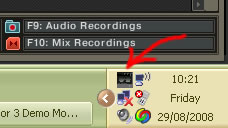
When you plug in your BCD3000 you should have a small black box in your status icon next to your clock in windows XP.
When you double click on this it gives you a simple setup dialog for the sound card.
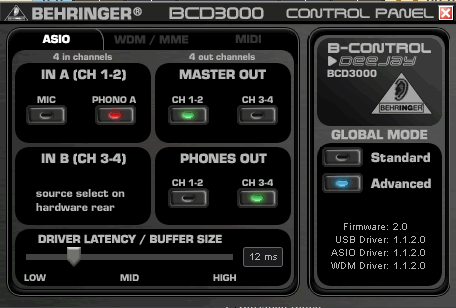
Select Advanced mode and output channels as shown above.
In trackor you then need to start file/preferences
then in audio setup-Soundcard check you have "BCD3000 ASIO" selected.
On the next Tab - Output Routing make sure you have external selected:
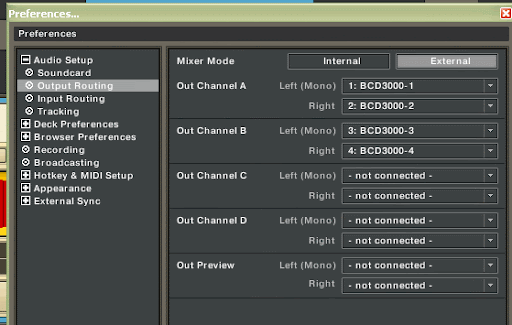
In output routing then select and assign the four outputs of the BCD to Monitor and master respectively.
If you don't see the small black box then download and run the exe below!
software here:
BCD3000setup_1-1-2-0.exe
Neil
Qualitydj
See the original video here!
BCD3000 Windows XP Driver setup
The issue is that the BCD will run with standard drivers but to get fun functionality out of it you need the proper ASIO drivers and control panel that comes on the install disc.
When you plug in your BCD3000 you should have a small black box in your status icon next to your clock in windows XP.
When you double click on this it gives you a simple setup dialog for the sound card.
Select Advanced mode and output channels as shown above.
In trackor you then need to start file/preferences
then in audio setup-Soundcard check you have "BCD3000 ASIO" selected.
On the next Tab - Output Routing make sure you have external selected:
In output routing then select and assign the four outputs of the BCD to Monitor and master respectively.
If you don't see the small black box then download and run the exe below!
software here:
BCD3000setup_1-1-2-0.exe
Neil
Qualitydj
See the original video here!
BCD3000 Windows XP Driver setup


